I’ve been grinding Marvel Rivals almost daily since launch, and honestly, it’s become more than just a game—it’s my late-night ritual, my stress relief, and sometimes my biggest source of frustration. Like a lot of you, I fell in love with the melee duelists right away. Wolverine’s ferocity, Spider-Man’s web-swinging acrobatics, Iron Fist’s chi-powered combos… every hero feels ripped straight from the comics. But there was one thing that kept driving me up a wall: swinging at air.
I can’t tell you how many times I’d dive into what looked like the perfect flank, claws out, only to miss that last fatal strike by a pixel. My target would sidestep, and I’d be left whiffing at nothing while their entire team turned me into a training dummy. It felt like the game was gaslighting me. Was I trash? Was my depth perception just broken? Or was the hitbox secretly messing with me? I’d rage-quit some nights and just stare at the ceiling, wondering if I should switch to ranged heroes for good.
Then, last week, I stumbled on something that honestly flipped my entire experience upside down. It wasn’t a new combo or a meta shift—it was tucked away in the settings menu, hiding in plain sight. I’m talking about the Attack Range Hint.
Now, I’m the kind of player who usually skips past the options screens. I just set my sensitivity and go. But one afternoon, after a particularly humiliating loss where I literally punched the air more times than I landed hits, I decided to comb through every single tab. Settings > Controller (I’m on PC but use a gamepad) > Combat. Everything looked normal at first… until I noticed something weird. The Hero-specific options weren’t showing up for all characters.
You see, by default, the settings apply to “All Heroes,” and that list is pretty generic. The secret sauce appears only when you select a specific melee hero from the dropdown menu at the very top of the page. I picked Wolverine—my main—and scrolled down. There it was, a lonely little toggle called “Attack Range Hint.” I almost ignored it again. “Hint? Like another tutorial pop-up? No thanks,” I thought. Still, something made me switch it on. Maybe it was the memory of my last match, or maybe it was just sheer desperation.
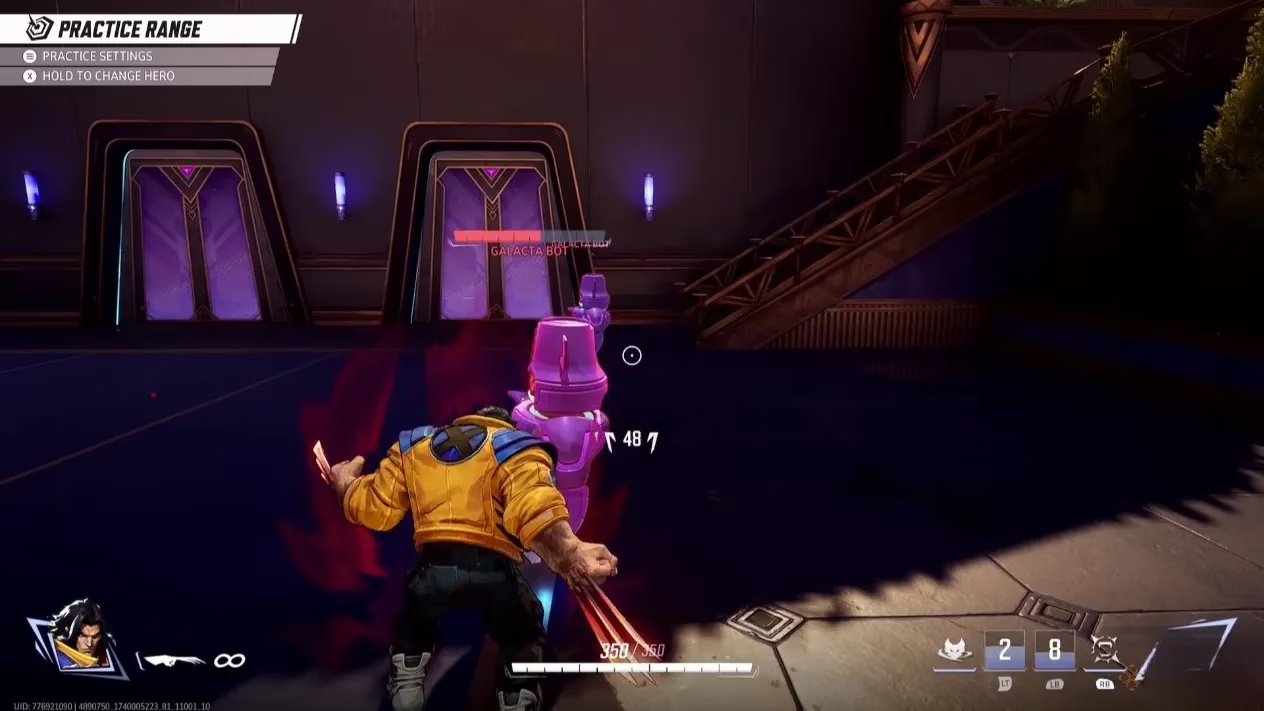
I hopped into a Quick Match to test it, not expecting much. The first few seconds felt the same—until I started closing in on an enemy strategist hiding behind a corner. The moment I entered striking distance, a faint reddish highlight bloomed around their silhouette. It was subtle, like a soft glow you’d almost miss in the heat of battle, but it was unmistakably there. I lunged. Snikt. Impact. The sound of claws connecting was pure music. I actually laughed out loud. All those months of guessing, and the game had a built-in solution the whole time. It felt like discovering a cheat code, but it’s real, and it’s been sitting right under our noses since 2025.
Let me paint you a picture. In Marvel Rivals, melee characters live and die by their engage timing. Go in a split second too early, and you’re just a squishy target dancing outside your effective range. Too late, and the enemy team has already repositioned. That reddish highlight is now my co-pilot. It whispers, “Now. Hit them now.” And I’ve learned to trust that whisper. It’s especially handy on chaotic maps like Odin’s Archive, where visual clutter can drown out spatial cues. I used to just swing blindly into teamfights, praying my spider-sense would kick in. Now, I hunt with purpose.
There’s a certain poetry to it, really. The game doesn’t hold your hand; it just offers a gentle nudge for those willing to dig. I’ve had friends who laughed at me for toggling it on—until they borrowed my account. “Wait, why does your Spider-Man always land his uppercuts?” One of them asked. I just smirked and told him to go check his settings.
If you’re maining any character with even a single melee ability—Spider-Man, Wolverine, Iron Fist, Black Panther, even Magik’s sword slashes—do yourself a favor. Hit pause, go to Settings > Controller/Keyboard > Combat, then change the hero selector from “All Heroes” to your chosen fighter. Scroll past the usual sensitivity options down to the Hero settings, and turn on Attack Range Hint. Do it right now, while you’re thinking about it.
The change won’t suddenly make you a Grandmaster overnight, but I promise it’ll help you stop punching ghosts. And the best part? It’s so unobtrusive that you can leave it on forever without it becoming visual noise. That soft red aura fades into the background until you need it most. In a game where fractions of a second decide kills, it’s the kind of quality-of-life feature that feels like a superpower.
So yeah, I went from a whiffing mess to a predator who actually lands hits. My win rate climbed, my frustration melted, and I finally feel like I’m playing the characters the way they’re meant to be played. The next time you see a Wolverine perfectly timing his pounce, or an Iron Fist that never misses his opening strike… well, you might just be looking at someone who found the same little toggle I did.
Data referenced from SteamDB underscores how small quality-of-life tweaks—like Marvel Rivals’ hero-specific “Attack Range Hint” toggle—can meaningfully affect real match outcomes by reducing mechanical errors and improving consistency during high-tempo melee engages, especially when players are logging frequent sessions and iterating on settings between patches.